Coding Agents
Benchmarks
Cloning Bench: Evaluating AI Agents on Visual Website Cloning
Research Team @ Vibrant Labs
Introduction
At Vibrant Labs, we conduct research on automatic environment design, world creation, and task/verifier mining for curriculum-based learning. In our work to advance the computer-use capabilities of frontier models, we ran several experiments to scale and automate the process of building simulation environments (specifically by cloning web applications).
As a result, we introduce Cloning Bench, our benchmark on the web cloning capabilities of frontier models, as well as our approach and observations.
Methodology
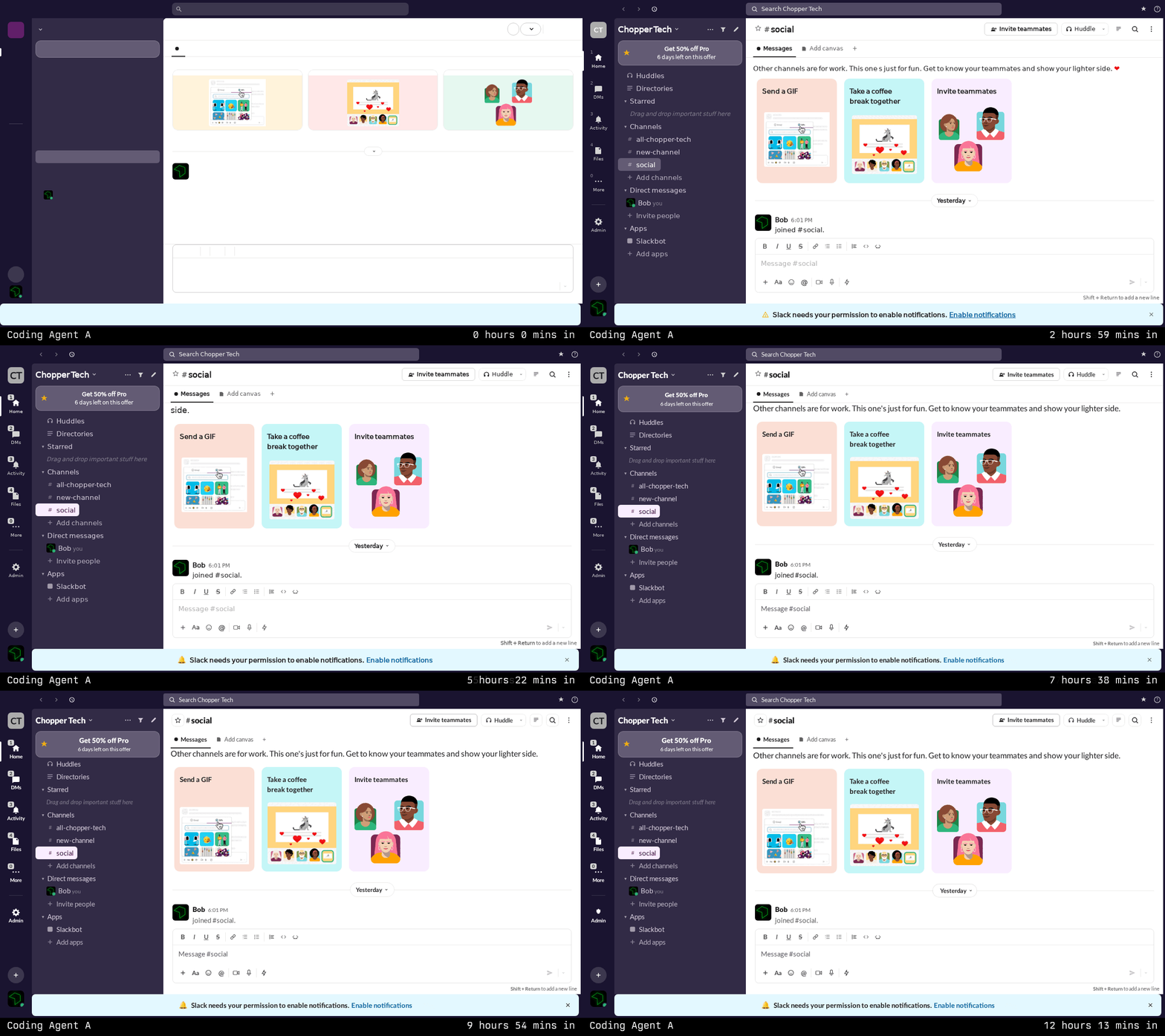
In Cloning Bench, each task gives an agent a clear visual target - a real website, captured as screenshots, DOM snapshots, and a test harness (site-test) that plays the role of the human in the loop. The harness runs the agent's clone through a scripted user flow, takes screenshots at key moments, and produces pixel-level diffs showing exactly where the clone diverges from the original. The agent reads the feedback, makes fixes, and runs the test again.
With this process, we are trying to create a closed feedback loop that the agent can do to correct its course until it satisfies the objective and do that as a long-running, unattended session. The spec is unambiguous (e.g., “match these pixels”), the feedback is precise (e.g., “here's a diff image with the problems highlighted in red”), and the loop can run as many times as the agent's budget allows.
Recording Real User Sessions
Each benchmark task begins with a recording. We have a human user who navigates a real website (we used Slack in the published results) while pressing a marker key at important moments - these are basically any important actions that change the screen in some way. The recording pipeline captures:
The full interaction session as a video
A fixed resolution screenshot at each marker point
The full HTML at each assertion point, along with associated styling and accessibility information
Images, icons, and fonts.
This produces a rich, multimodal reference for each task. The agent has access to the structure, styling, and assets it needs, but must synthesize them into working React components.
Above: an example of a recording conducted by a human user and provided to the agent
Screenplay Generation
From each recording, we generate a screenplay: a structured test script that describes the user's flow as a sequence of actions, assertions, and waits.
Above: an example of an action and an assertion generated by the agent
For this benchmark iteration, we are currently using a single recording of a Slack session which produces 43 steps covering channel navigation, hover states, message sending, emoji reactions, and message deletion with 33 visual assertion checkpoints. The screenplay serves both as the specification the agent must satisfy and as the automated test harness used to evaluate the result.
Autonomous Agent Loop
Each agent runs in an isolated environment with access to the recordings, a Vite + React project scaffold, and a set of CLI tools:
agent-browser: (https://agent-browser.dev/): Puppeteer-based browser automation for navigating and interacting with the clone. We also provide its associated skill to the coding agents.site-test: Executes the screenplay against the running clone, capturing screenshots at each assertion point and computing visual similarity.site-test-diff: Generates overlay images highlighting pixel-level differences between the reference and clonelookatdiff: Uses a one-shot LLM query (to a fixed model - e.g., Gemini 3 Pro) to generate a diff description and things to improve, as well as to classify flagged differences as structural (a “must-fix”) or dynamic (a “can ignore”)
The agent is expected to operate in a continuous iteration loop:
Read the screenplay and reference materials
Build or improve the React clone
Run
site-testto evaluate visual fidelityAnalyze diffs to identify remaining discrepancies
Fix the highest-priority issues
Return to step 3
There is no "done" state - the agent iterates until its time or resource budget is exhausted. This design tests not just initial code quality, but the agent's ability to self-evaluate, diagnose visual regressions, and make targeted fixes under an iterative feedback loop.
Visual Evaluation Pipeline
Evaluation uses a two-stage approach:
Stage 1: SSIM (Structural Similarity Index). For each assertion checkpoint, the reference and clone screenshots are compared using SSIM, producing a score from 0.0 (completely different) to 1.0 (pixel-identical). A threshold mask at σ=25 identifies regions with meaningful pixel differences, which are rendered as a color-coded diff image.
Stage 2: Dynamic Content Detection. Not all pixel differences represent failures. Timestamps, notification counts, and Slack upgrade promotions change between captures. An optional LLM-based second pass classifies flagged regions so the scores can be correctly evaluated. This two-stage approach avoids penalizing agents for differences they cannot control while maintaining strict accountability for layout, component structure, and interactive states.
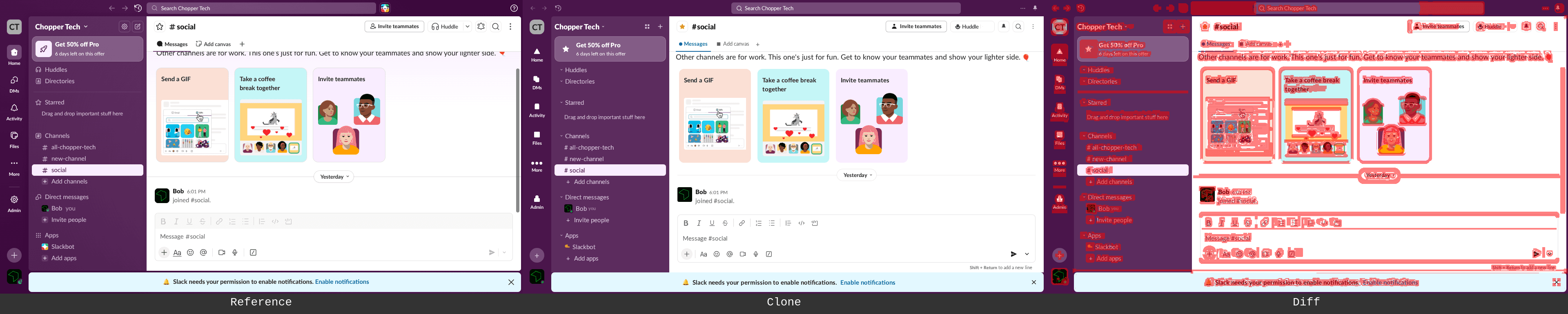
Above (left to right): screenshot from the human trajectory recording of actual Slack; screenshot of an agent-generated Slack; screenshot of an agent-generated Slack with the threshold mask mentioned above
Setup
Models
We evaluated four frontier coding agents:
Claude Code with Claude Opus 4.6 as the model (
claude-opus-4.6)Codex CLI with GPT 5.3 Codex as the model (
gpt-5.3-codex)Gemini CLI with Gemini 3 Pro as the model (
gemini-3-pro-preview)Pi with GLM 5 as the model
Each agent receives identical instructions, identical recordings, and identical tooling. The only variable is the underlying model.
Environment
Each agent runs in an isolated Docker container with:
A pre-initialized Vite + React project
Read-only access to the recordings directory
The full CLI toolchain (
agent-browser,site-test,site-test-diff,lookatdiff)Model-specific API credentials
A fixed browser viewport of 1280×720
Approximately 6 hours of wall-clock time
Guardrails
To ensure agents are genuinely building UIs rather than gaming the evaluation, two hard constraints are explained to the coding agent as a prompt (part of their associated AGENTS.md file):
No screenshot embedding. Agents may not copy reference screenshots into their clone as
<img>sources, CSS backgrounds, or base64 data URIs.No verbatim DOM injection. Agents may not copy
dom.htmlfiles and render them viadangerouslySetInnerHTMLor equivalent.
Agents are allowed—and encouraged—to extract individual assets (icons, logos, fonts) from the recordings using the manifest, and to reference the DOM snapshots, accessibility trees, and computed styles as design specifications.
Results
Summary
Claude | Gemini | GLM | Codex | |
|---|---|---|---|---|
Final Avg SSIM | 0.757 | 0.871 | 0.723 | 0.583 |
Peak Assertion SSIM | 0.790 | 0.910 | 0.728 | 0.606 |
SSIM Improvement | +0.142 | +0.254 | +0.060 | -0.010 |
Test Runs | 14 | 41 | 91 | 46 |
Test Success Rate | 71% | 71% | 25% | 43% |
Source Lines (JSX) | 925 | 2,194 | 677 | 483 |
Source Lines (CSS) | 1,657 | 467 (+4.8MB prod CSS) | 998 | 782 |
Assets Extracted | 34 | 62 | 20 | 19 |
Interactive Features | Full | None | Full | Full |
SSIM Progression
The four agents exhibited strikingly different trajectories:
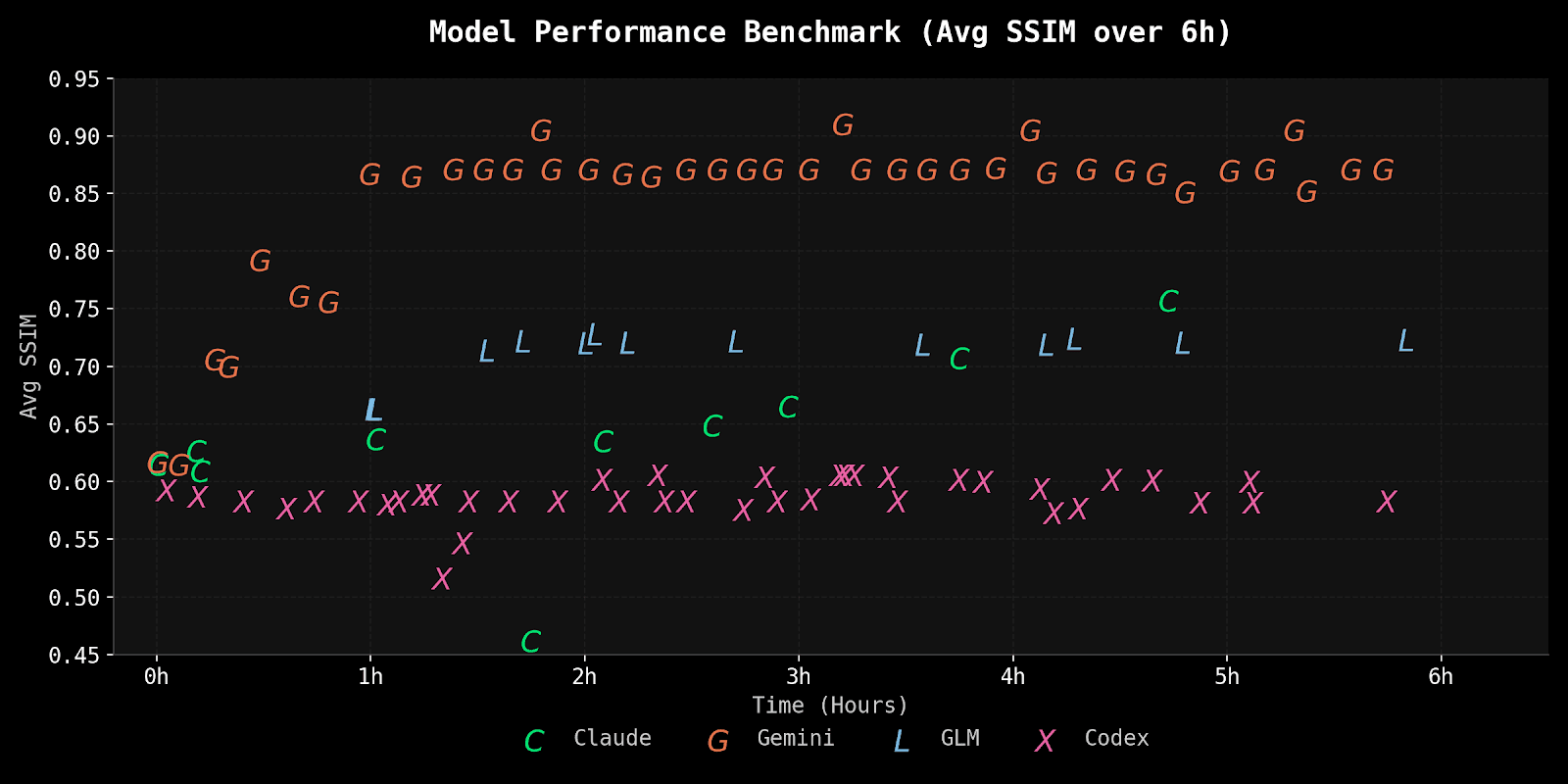
Gemini achieved the highest visual fidelity, reaching 0.87 average and 0.91 on static assertions, but with zero interactivity. Claude showed steady progress through consistent iteration, improving from 0.615 to 0.757, though it did not achieve the highest scores. GLM reached a respectable 0.72 quickly but flatlined for the remaining 5 hours. Codex was the most concerning: essentially unchanged from first measurement (0.593) to last (0.583) despite continuous iteration.
Every agent hit a ceiling. The universal pattern was rapid early gains followed by diminishing returns. The last 4-5 hours of each session yielded marginal improvements compared to the first 1-2 hours.
Qualitative Analysis
Claude Code
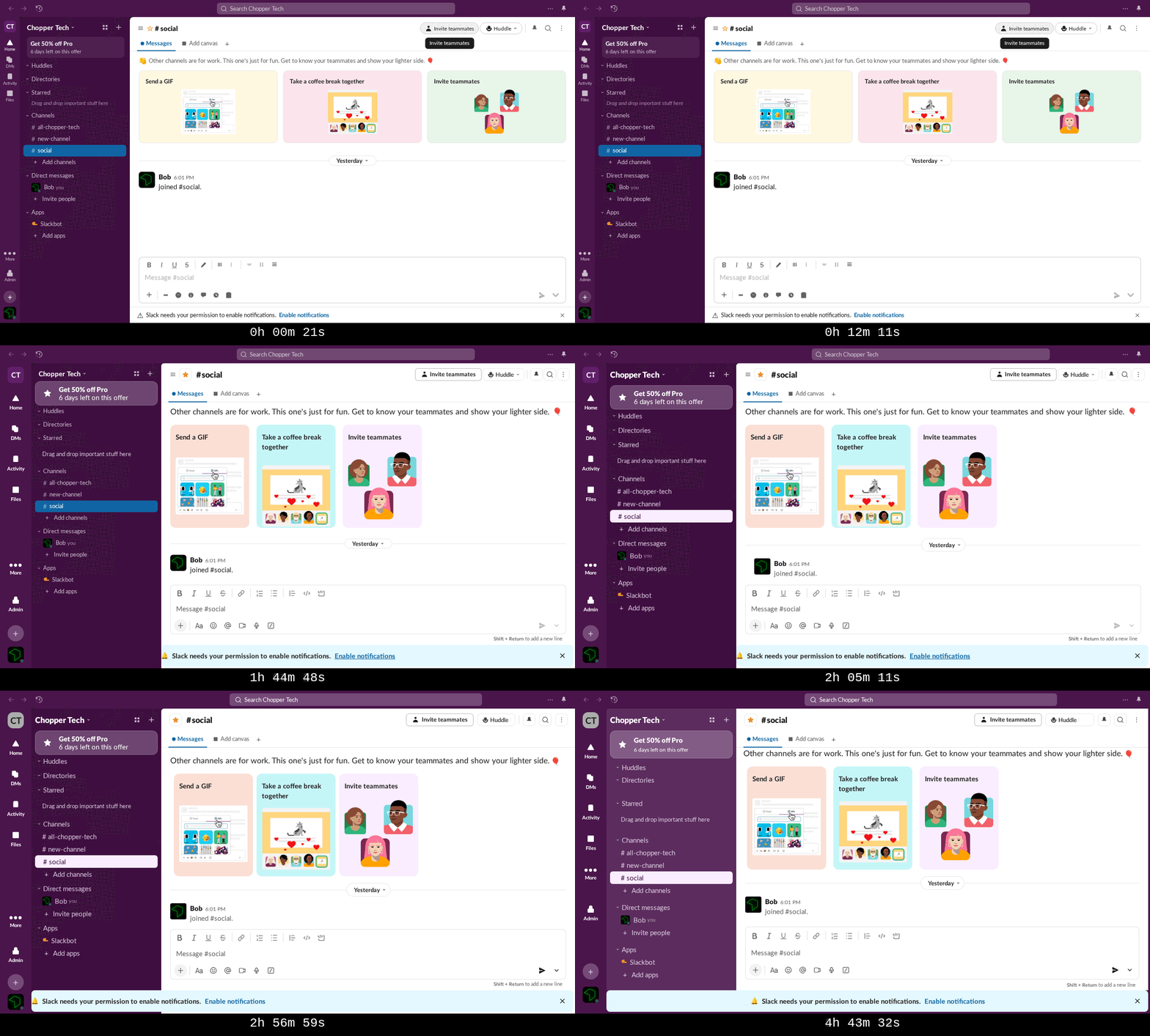
Claude Code's session was defined by iterative improvement and self-correction. Over 6 hours, the agent produced a 925-line single-file React application with 1,657 lines of generated CSS, implementing every interactive feature required by the screenplay: channel switching, tooltips, dropdown menus with hover states, message composition and sending, emoji reactions, message action menus, and a delete confirmation modal.
The agent's build-test-fix loop was methodical. It executed 14 test runs, with the first successful run scoring SSIM 0.615 and the final run reaching 0.757, a 23% relative improvement. The improvement was not monotonic: test 7 (around the 2-hour mark) introduced a regression that dropped the average SSIM to 0.462 when a CSS change broke the message area layout for all post-message-send views. The agent identified and fixed the issue within 20 minutes, returning to pre-regression levels by the next test.
This recovery behavior is Claude's strongest characteristic in the benchmark. When something breaks, the agent actively diagnoses the regression and targets the fix rather than continuing to pile changes on top. The Tasks system served as persistent memory across context compaction boundaries, helping the agent maintain awareness of its work items even after losing conversational context.
The flip side was context pressure. With a 180K-token window and 67 compaction cycles (roughly every 5 minutes), Claude was frequently re-reading the same reference files. Of its 2,096 tool calls, 626 were Read operations, many of them redundant re-reads forced by context eviction. The compaction overhead is real: nearly half the session's API calls served context management rather than productive development.
The weakest point was the delete confirmation modal (assertion 40), which never exceeded SSIM 0.55 across all tests. Despite being consistently the worst-performing assertion, the agent prioritized higher-leverage improvements (font loading, layout padding, welcome card styling) that moved many assertions simultaneously. This was arguably the right strategy for maximizing average SSIM, but it left an obvious gap.
Gemini CLI
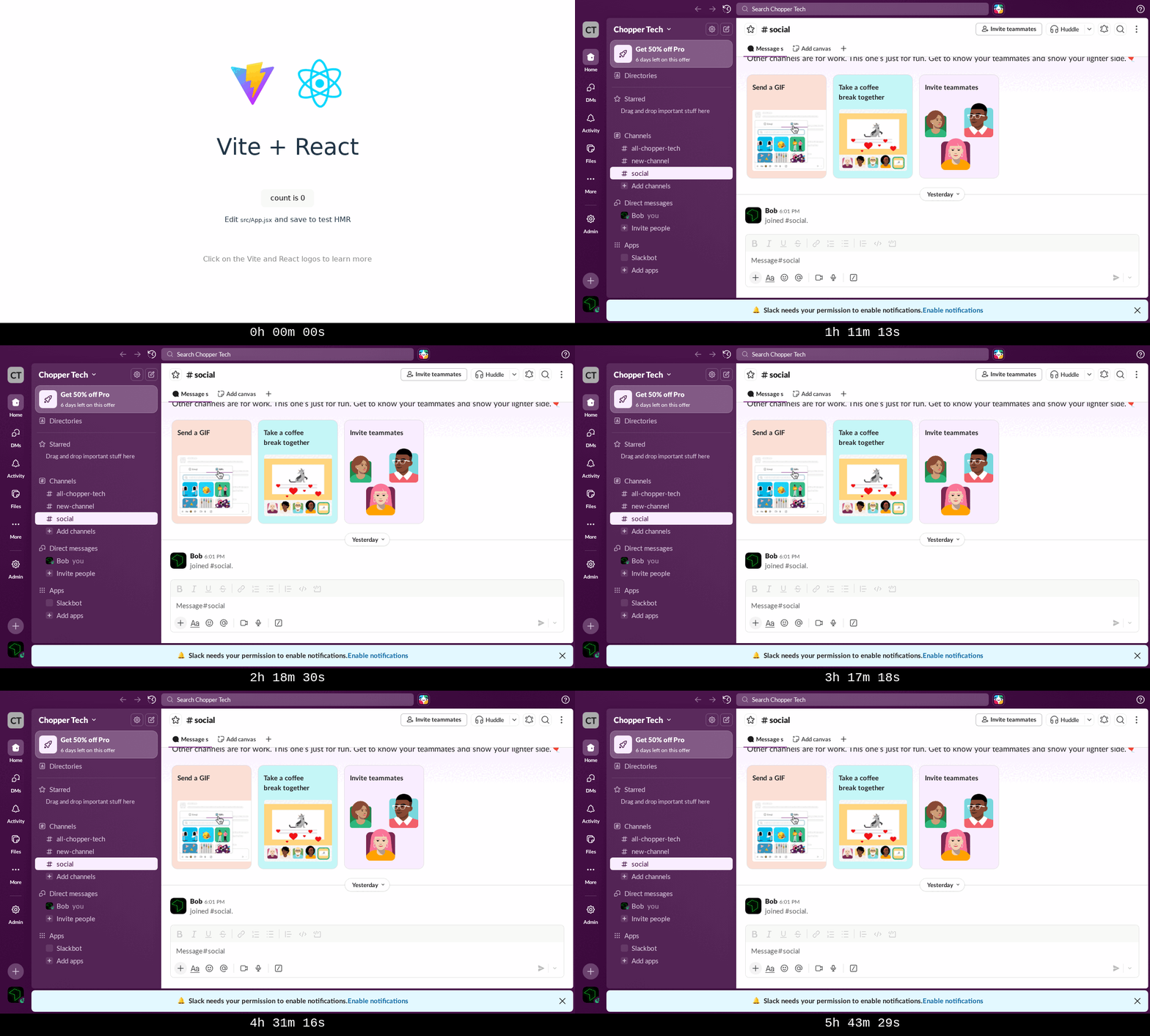
Gemini took an approach that none of the other agents attempted: it wrote a compiler instead of writing an application.
Rather than studying the reference recordings and hand-coding React components to match, the Gemini agent created a Node.js pipeline using Cheerio that programmatically parsed the reference dom.html and generated React JSX components. The pipeline consisted of 10 utility scripts (build_react.cjs, build_app.cjs, extract_images.cjs, extract_fonts.cjs, fix_image_urls.cjs, and others) orchestrated by a shell script. It extracted specific DOM sections by CSS selector, recursively converted HTML elements to JSX (handling class to className, tabindex to tabIndex, inline style strings to style objects, and dozens of other attribute transformations), and wrote the results to separate component files.
The other half of the strategy was equally unusual: instead of hand-writing CSS, the agent copied Slack's production CSS files directly from the recording assets, 4.8 MB of the real Slack design system. Since the generated components used the exact same class names as the production DOM, the styling applied automatically.
This produced the highest SSIM scores in the benchmark: 0.90-0.91 for static UI assertions. The structural fidelity was near-perfect because the clone was, structurally, a mechanical translation of the original DOM.
The tradeoff was absolute: zero interactivity. The generated components contained no useState hooks, no event handlers, no channel switching, no message sending, no reactions. The clone was a static render of a single DOM snapshot. When the site-test runner tried to perform actions like switching channels or sending messages, nothing happened. The UI couldn't respond.
The session also had a dramatic structural problem. The entire 6-hour run consisted of just 2 LLM API responses. The first response contained 130 tool calls (the productive phase: exploration, pipeline development, iterative fixes). The second response, triggered after a loop detection event at the 2-hour mark, contained only 27 tool calls, almost all of them bare site-test invocations with no code changes between them. The agent spent the last 3 hours and 41 minutes running the same test over and over, producing no SSIM improvement.
The token efficiency was remarkable: 233,093 total tokens across the entire session, compared to ~78 million for Codex and Claude. Both API responses produced empty string text content; all work was done purely through tool calls. This is roughly 337x more efficient in API consumption than the other agents, though the efficiency came partly from the agent becoming stuck in an unproductive loop for the final 60% of the session.
The DOM-to-JSX approach also pushed against the benchmark's guardrails. While the generated output was valid JSX with properly converted attributes (not raw HTML injection), the approach was closer to "converting" than "rewriting" the UI. The components were mechanically transformed, not designed.
GLM-5
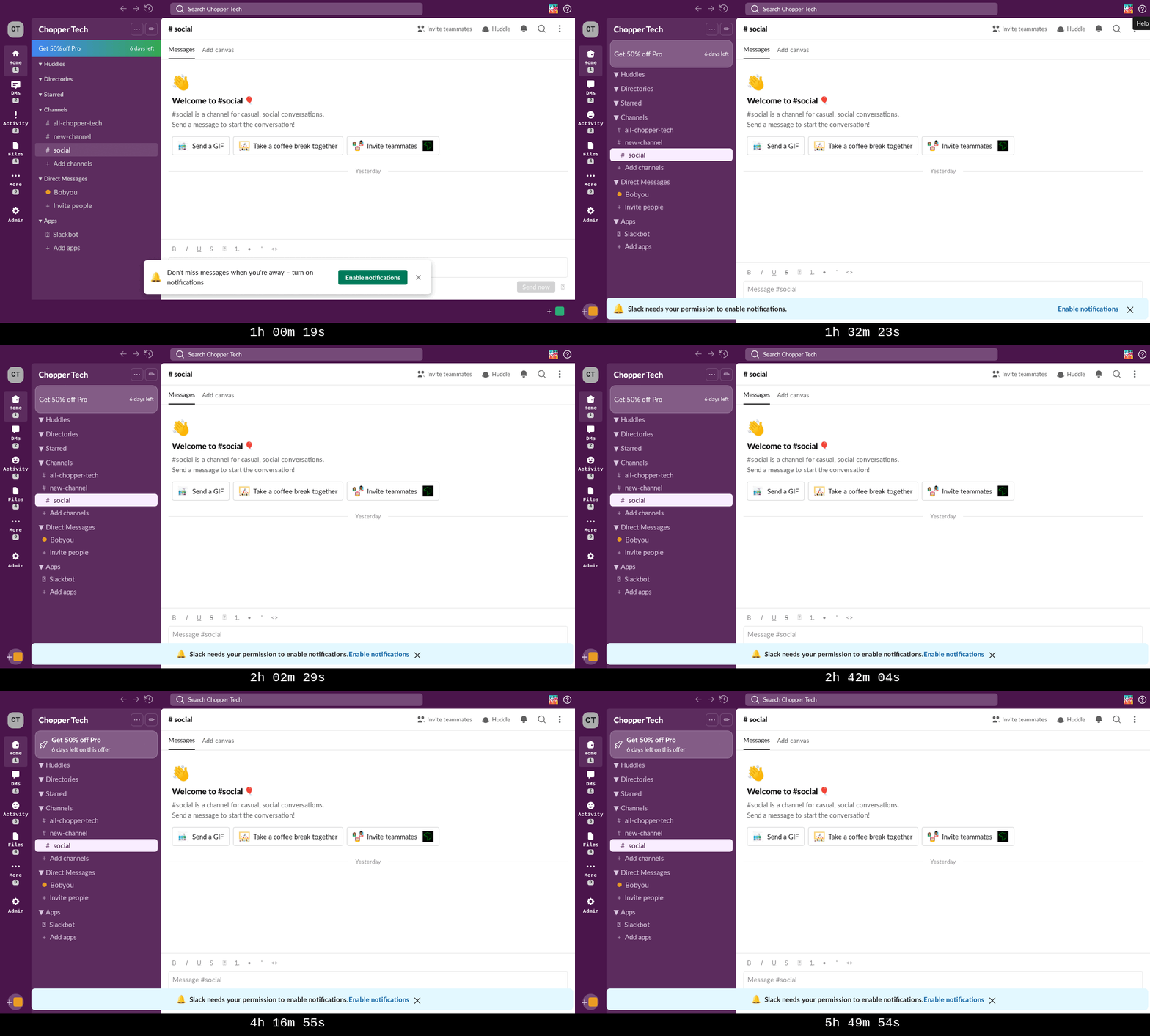
GLM-5 produced the most well-structured code of any agent in the benchmark despite achieving only the third-best SSIM score. The 677-line App.jsx contained 12+ named component functions (Tooltip, TopNav, TabRail, ChannelSidebar, ChannelHeader, ChannelTabs, WelcomeMessage, Message, Composer, Menu, DeleteModal, NotificationDialog, ControlStrip, and the root App), each with clear responsibility boundaries. The other agents either crammed everything into a single function (Codex's App + one MessageToolbar) or generated code mechanically (Gemini).
The state management was also the most realistic. Where Codex tracked messages with boolean flags (messageSent, messageDeleted) and could only handle the single "Hello" message required by the screenplay, GLM implemented a proper messages array with add/delete operations, a reaction system with emoji counts, and dynamic tooltip positioning using getBoundingClientRect().
The problem was the SSIM ceiling. After jumping from 0.663 to 0.723 in the first hour, scores flatlined completely. Five more hours of continuous iteration produced zero measurable improvement. The agent kept making CSS edits (33 of its 51 file modifications targeted index.css) and running tests (91 site-test invocations, 77 site-test-diff calls), but nothing moved the needle.
A significant contributor to the ceiling was a visual shortcut: the agent used Unicode emoji characters (home, envelope, bell, folder, gear, magnifying glass) for the tab rail and toolbar icons instead of extracting and using Slack's custom SVG icons. Emoji rendering is OS-dependent and looks nothing like Slack's iconography. The Slack Icons font file was actually extracted and loaded via @font-face, but the agent never wired up the icon font glyphs.
At $23.69 in total API cost, this was by far the best price to performance ratio, driven by the agent's moderate token consumption (~4M input tokens vs. ~78M for Codex).
Codex
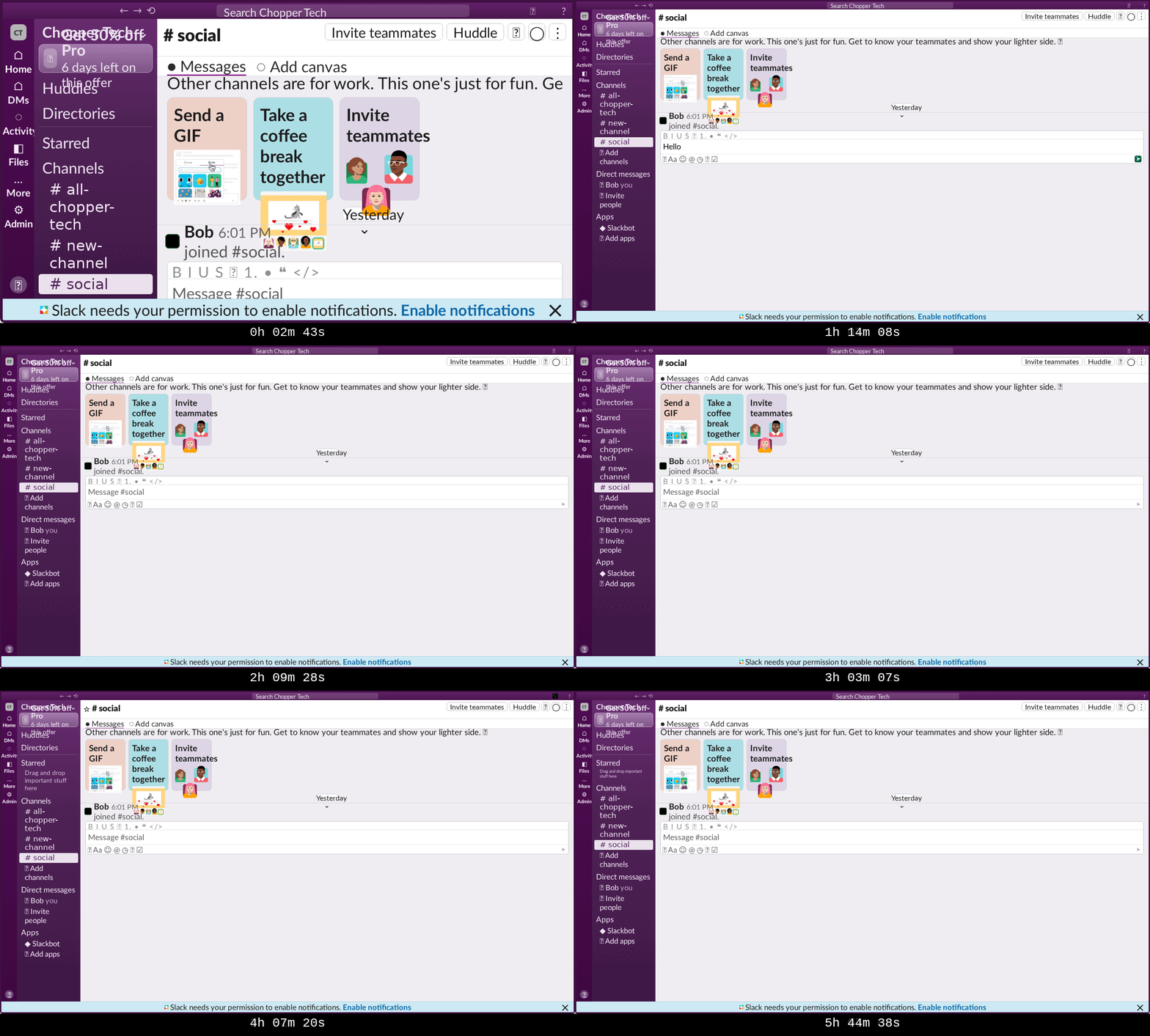
Codex (GPT-5.3-Codex) was the fastest to scaffold: a complete 483-line Slack UI clone with 782 lines of CSS in approximately 7 minutes, including asset extraction and font loading. It was also the first to achieve a full 43/43 screenplay pass (at 32 minutes) thus implementing the functional aspects fully enough for the test runner to run to completion. These early results were promising.
Then nothing improved, especially on the visual issues. The SSIM trajectory was essentially flat: 0.593 at the first measurement (around the 10-minute mark) to 0.583 at the last (approaching hour 5). Five hours of continuous iteration produced no meaningful visual improvement.
The primary time sink was a 90-minute scaling calibration loop between hours 1 and 2.5. The agent's CSS architecture used a 2560x1440 viewport with zoom: 0.5, effectively rendering at double size then scaling down. This required doubling all CSS measurements (a 19px font becomes font-size: 38px), and small rounding errors compounded across the layout. The agent recognized this was suboptimal and tried alternatives (native 1280x720, intermediate sizes with various zoom values, CSS transform: scale()), but each experiment produced similar or worse SSIM scores, and the agent reverted every time. It never identified the root cause (rounding errors from doubled measurements) and never found a way out.
One notable implementation gap that was seen was that the CSS file defines .modal-overlay and .modal classes for a delete confirmation dialog, but these classes are never referenced in the JSX. The agent wrote the styles for a proper modal but never built the component, instead using a "click twice to delete" pattern via a boolean flag. This directly contributed to the lowest SSIM on the delete modal assertion (0.516-0.544), a problem shared by all agents but most pronounced here.
The agent also never made a single git commit, despite having an initialized repository. With no version control, there was no way to roll back when experiments failed. This was a notable omission during the 90-minute scaling spiral where reverting to a known-good state would have saved significant time.
Cross-Cutting Findings
The Fidelity-Interactivity Tradeoff
The most striking result is the gap between Gemini's SSIM scores and those of every other agent. At 0.87-0.91 on static assertions, Gemini was in a different league. But this came at the cost of zero interactive behavior: no channel switching, no message sending, no reactions, no menus.
The agents that implemented full interactivity (Claude, GLM, Codex) scored significantly lower. This reveals a fundamental tension in the benchmark: structural fidelity to a DOM snapshot and functional interactivity are partially competing objectives. Building working React components with state management, event handlers, and dynamic rendering introduces layout differences that a static render avoids.
This is worth acknowledging as a benchmark design consideration. A pure SSIM comparison underweights the engineering required for interactivity. Future iterations could weight interactive assertions more heavily, or score interactivity as a separate dimension.
The Delete Modal Problem
Across all four agents, the delete confirmation modal was consistently the worst-performing assertion:
Agent | Delete Modal SSIM | Average Across All Other Assertions |
|---|---|---|
Claude | 0.550 | 0.770 |
Codex | 0.532 | 0.590 |
GLM | ~0.69 | ~0.72 |
Gemini | N/A (never reached) | 0.871 |
Modals are structurally challenging for clones: they involve a backdrop overlay, precise centering, specific button styling, and a layout that differs significantly from the main application chrome. The delete modal also appears only after a multi-step flow (hover message, open action menu, click delete), making it harder for agents to iterate on since they see it less frequently in test runs.
Testing as the Hidden Bottleneck
Across all four agents, running site-test consumed approximately 40-50% of total wall-clock time:
Agent | Estimated Test Time | % of Session |
|---|---|---|
Claude | ~2.9 hours | 48% |
Codex | ~2.5 hours | 42% |
Gemini | ~3.0 hours | 51% |
GLM | ~3.0 hours | 50% |
Each full site-test run took 13-22 minutes (executing 43 screenplay steps with browser automation). This means agents had effectively only 3 hours of actual development time in a 6-hour session. The test bottleneck particularly hurts agents that need more iterations to converge.
Reducing test cycle time would likely produce better final scores across the board. Partial test runs (testing only changed assertions) or parallel screenshot capture could reclaim significant wall-clock time for the agents.
Context Management Strategies
The four agents showed dramatically different context management profiles:
Agent | Context Window | Compaction Events | Avg Time Between |
|---|---|---|---|
Claude | 180K tokens | 67 | ~5 min |
Codex | 258K tokens | 3 | ~2 hours |
GLM | 203K tokens | 1 | N/A |
Gemini | Unbounded* | 0 | N/A |
*Gemini's two-response session structure avoided traditional context management entirely.
Claude's aggressive compaction rate (every ~5 minutes) had measurable costs: redundant file reads, occasional regressions from lost context, and reliance on TodoWrite as a memory bridge. Codex's larger context window gave it roughly 40x longer between compactions, though this advantage didn't translate to better SSIM scores. GLM's single compaction event occurred only when the context was nearly full at the 5-hour mark.
The Gemini agent sidestepped context management entirely by batching 130 tool calls into a single API response, but this created a different problem: when that response ended, the agent had no effective way to continue productive work.
Universal Diminishing Returns
Every agent followed the same macro pattern: rapid initial progress followed by a plateau. The improvement rate per hour decreased sharply after the first 1-2 hours:
Agent | Hour 0-1 Improvement | Hour 1-2 Improvement | Hour 2-6 Improvement |
|---|---|---|---|
Claude | +0.023/hr | +0.007/hr | +0.027/hr* |
Gemini | +0.175/hr | +0.058/hr | ~0/hr |
GLM | +0.060/hr | ~0/hr | ~0/hr |
Codex | ~0/hr | ~0/hr | ~0/hr |
*Claude's later improvement came from high-leverage systematic changes (font loading) that affected all assertions simultaneously.
The diminishing returns pattern suggests that the easy wins (layout structure, major CSS properties, font loading, etc.) are captured quickly, while the remaining gap consists of dozens of small visual differences (padding, margin, border-radius, letter-spacing, specific icon rendering, etc.) that each require targeted investigation and produce minimal SSIM movement. None of the agents demonstrated an effective strategy for systematically closing this long tail of small differences.
What's Next
This is the first iteration of Cloning Bench, and we see clear directions for improvement:
More targets. The current benchmark uses a single Slack recording. We plan to expand to multiple web applications with varying complexity, from simple marketing pages to complex data-rich dashboards.
Longer test scripts. The 43-step screenplay covers core Slack functionality but doesn't exercise deeper features like search, threads, file uploads, or settings panels. Longer screenplays would better test agent endurance and state management complexity.
Separate interactivity scoring. The current SSIM-only metric underweights functional correctness. A composite score that evaluates both visual fidelity and interactive behavior would give a more complete picture of clone quality.
Faster test cycles. The test harness is the primary bottleneck. Incremental testing (re-running only affected assertions), parallel screenshot capture, and lighter-weight diff computation could reclaim significant development time for agents.
Want to work with us?
We work with AI labs to co-design and synthesize data & environments for RL post-training using methods that are cheaper and more scalable than fully human-annotated data. If you'd like to work/talk with us, email us at team@vibrantlabs.com or grab some time here!

